8. Tutorials
Lesson 11: Logging the Sortie – The Result Dropdown
Published: 2026-09-11
Mission Outcome
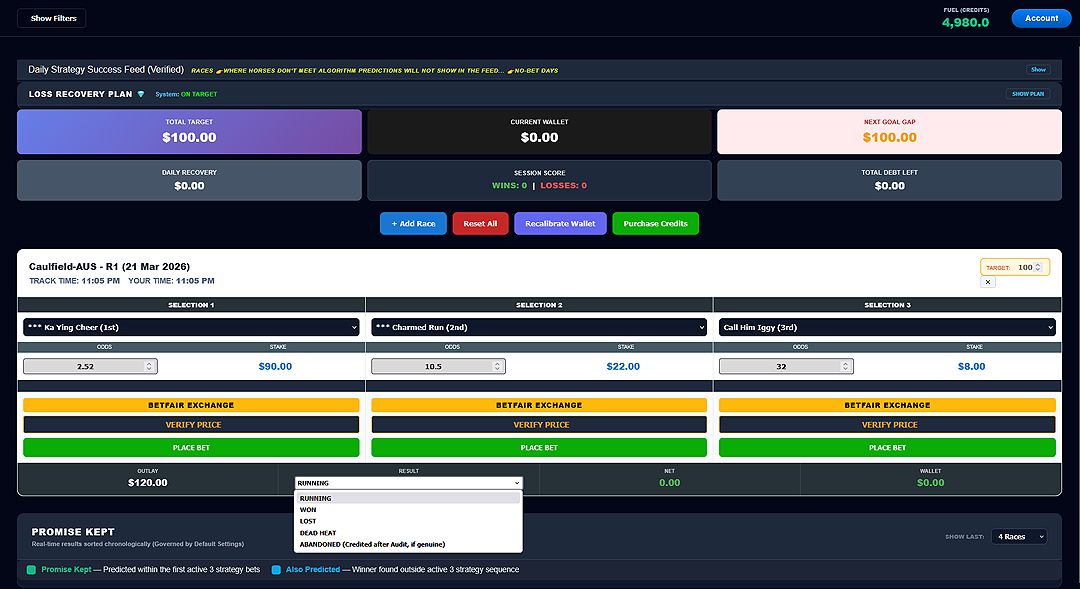
Once the race is over, the Operator must inform the system of the outcome. This allows the Success GAP Engine to recalculate your wallet in real-time. You do this using the RESULT dropdown at the bottom of the card.
The Four Outcome States
- WON: Your primary target was achieved. This will trigger the Manual Settlement box (see Lesson 12).
- LOST: The mission did not reach the objective. The system will automatically move those losses into the Recovery logic.
- DEAD HEAT: Two horses tied for the win. Select this to ensure the math accounts for the reduced payout.
- ABANDONED: Use this if the race was canceled or your horse was scratched. This ensures your credits are refunded correctly after audit.
Summary for Lesson 11: Never leave a race card as "RUNNING" once the race is over. Settle the result immediately to keep your dashboard synchronized.