8. Tutorials
Lesson 12: Syncing the Engine – Manual Payout Settlement
Published: 2026-09-11
The Payoff: Closing the Trade
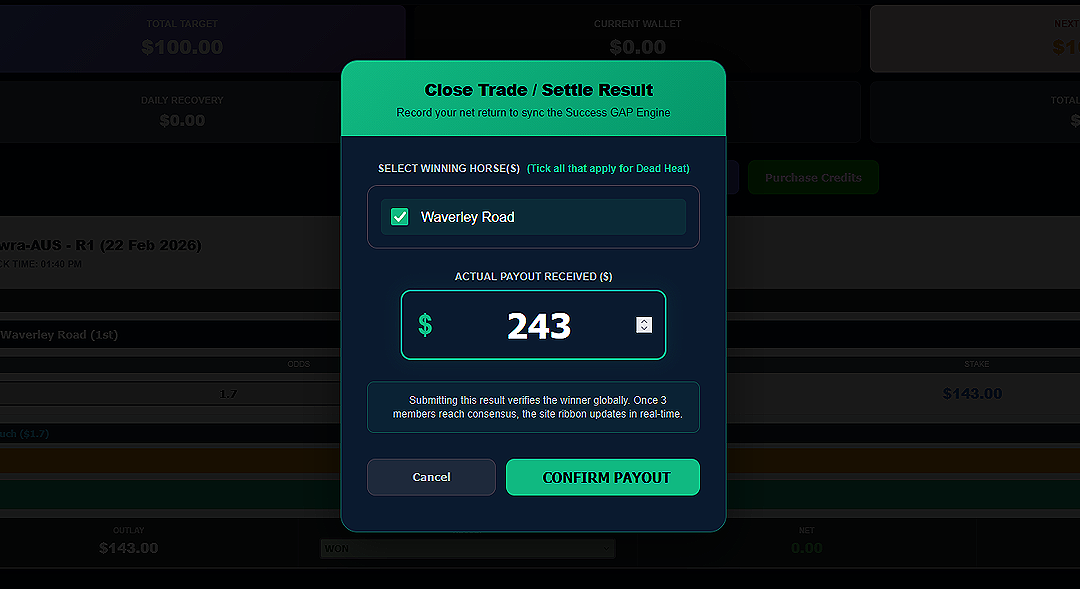
When you select "WON" in the result dropdown, the Close Trade / Settle Result box appears. This is the most satisfying part of the operation—it’s where you record your profit and sync the system.
The "SISO" Manual Settlement
Why do we make you enter the payout manually? Because bookmakers often have slight variations in final prices. To be pedantic about accuracy, the machine needs to know exactly how much cash landed in your account.
- 1. Select the Winner: Tick the box next to the horse that secured the win.
- 2. Enter Actual Payout: Check your bookmaker's "Settled Bets" screen. Type the total payout (Stake + Profit) into the green box.
- 3. Confirm Payout: Click the button to finalize the mission.
Engine Synchronization
The moment you hit CONFIRM PAYOUT, the dashboard updates. Your Next Goal Gap will shrink, and your Wallet will grow. The mission is officially complete, and the cockpit is ready for your next sortie.
Congratulations, Operator. You have completed the full training cycle. The sky is yours.