8. Tutorials
Lesson 7: The Command Center – Understanding Your Cockpit
Published: 2026-09-11
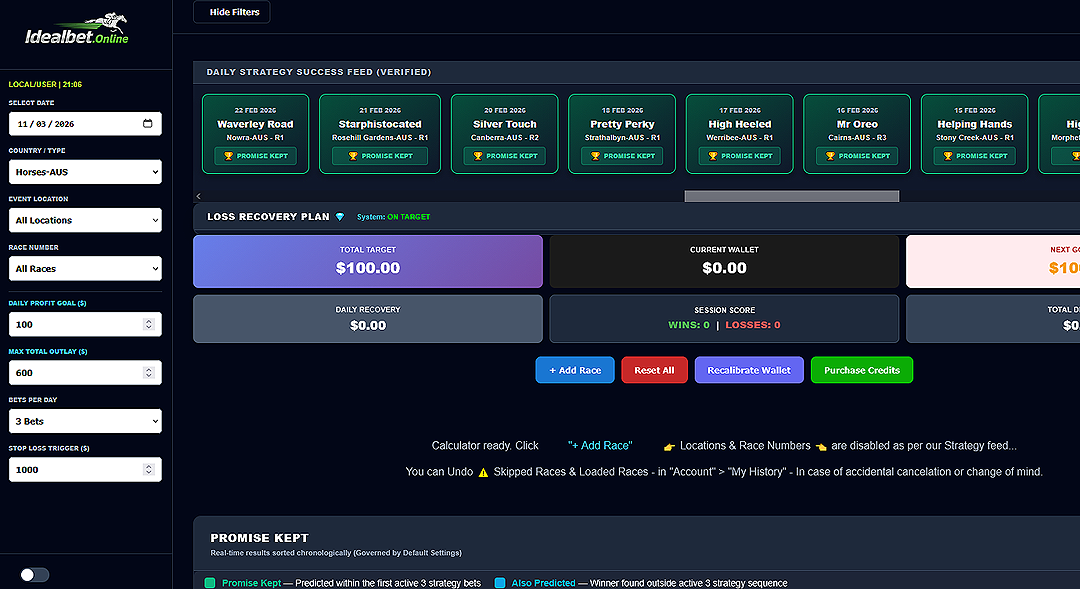
Welcome to the Pilot's Seat
When you first open the IdealBet Calculator, it looks like there is a lot going on. Don't worry—you don't need to be a rocket scientist to fly this thing. It is designed to be a Command Center where all the hard math happens in the background, leaving you with simple instructions.
The Two Main Zones
To keep it simple, think of the screen in two parts:
- 1. The Sidebar (Left Side): This is your "Mission Setup." You tell the system your Daily Goal, your Max Outlay, and your Stop Loss. You set these once at the start of your session.
- 2. The Main Console (Center): This is your "Heads-Up Display." It shows your Total Target, your Wallet, and your Success Feed. This is where you monitor your progress in real-time.
The Goal Gap: Your Only Mission
The most important box on this screen is the NEXT GOAL GAP. This tells you exactly how many dollars you need to win to hit your profit target for the day. Your only job as an Operator is to follow the system until that number hits $0.00.
Safety First
Notice the Status Bar at the top. If it says ON TARGET, you are flying in clear skies. If the system detects a bump, it will automatically offer you a recovery plan (which we will cover in the next lesson).
Summary for Lesson 7: Use the sidebar to set your limits. Use the center console to track your target. If you follow the signals, the dashboard does the rest.
In Lesson 8, we’ll open up the hood and look at the Loss Recovery Plan.