8. Tutorials
Lesson 8: Auto-Pilot Recovery – Handling the Bumps
Published: 2026-09-11
Don't Panic, Just Repair
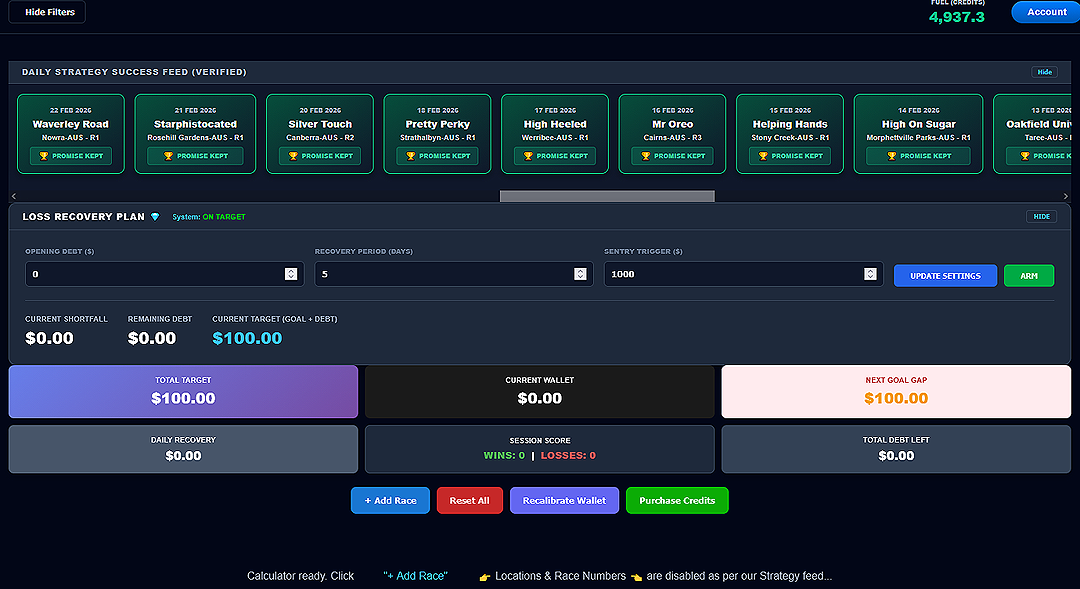
In Lesson 3, we talked about the "Safety Net." Now, it's time to show you how to actually use it. On your dashboard, you will see a box labeled LOSS RECOVERY PLAN. This is your bankroll’s maintenance hatch. When you hit a losing streak, you don't chase—you Repair.
Opening the Hood
By clicking the SHOW PLAN button, you reveal the inner workings of the recovery system. Here is what those numbers mean in plain English:
- Opening Debt: This is the amount the market currently owes you. If you've had a few losses, the system tracks every cent here.
- Recovery Period (Days): This is the most important setting. It tells the machine how many days you want to take to win your money back. We usually recommend 5 to 7 days. Slow and steady ensures you don't crash.
- Current Target (Goal + Debt): The machine automatically takes a "slice" of your debt and adds it to your Daily Goal. This creates your new mission target.
The "Set and Forget" Logic
The beauty of the IdealBet machine is that you don't have to do the math. Once you enter your debt and choose your recovery days, click UPDATE SETTINGS and then hit the ARM button.
The system is now "Armed" and ready. Every race you load from that point on will have the recovery logic built into the stakes automatically. You just follow the Green Signal.
Stay Disciplined
The "deadheads" try to recover everything in one race. That is how they go broke. The professional Operator understands that a 5-day recovery plan is the safest way to fly. The goal is to get back to ON TARGET status without taking unnecessary risks.
Summary for Lesson 8: Use "Show Plan" to see your status. Spread your recovery over several days. "Arm" the system and let the math do the heavy lifting.
In Lesson 9, we’ll prepare for takeoff: Loading a Race.