8. Tutorials
Lesson 9: Mission Briefing – Loading Your Target
Published: 2026-09-11
Preparing for Takeoff
Once you’ve found a "Green Signal" in a country you want to operate in, it’s time to load the mission. Clicking the + ADD RACE button is like a pilot receiving their flight coordinates. Before the system lets you fly, it presents you with a Mission Briefing.
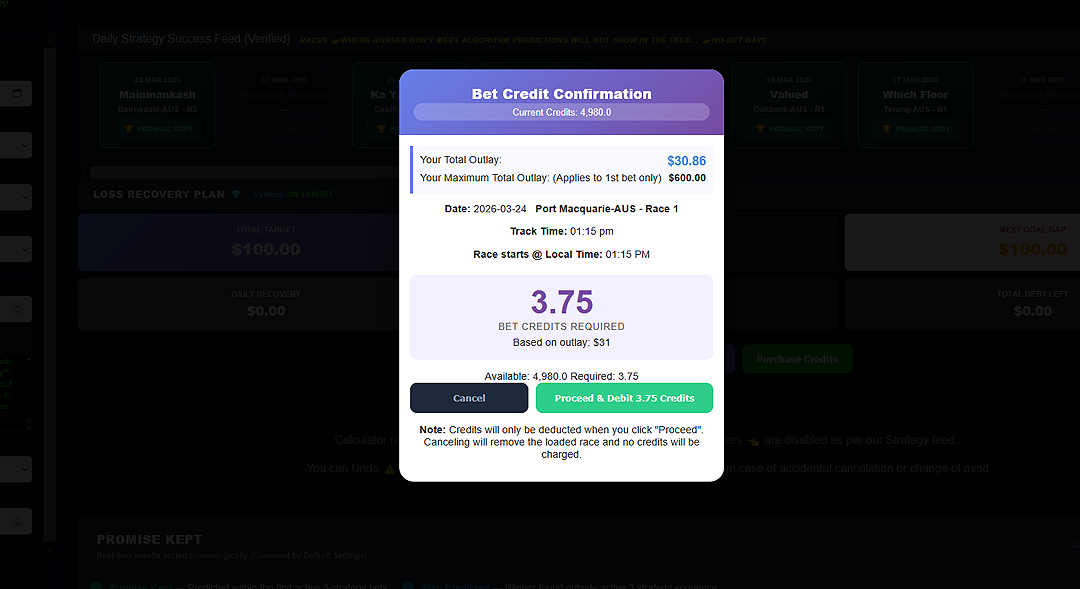
The Confirmation Modal
This popup is your final check before committing capital. Here is what you need to look at:
- Your Total Outlay: Based on your Daily Goal, the machine calculates the exact "fuel" (money) needed for this race. You don't have to guess; the math is done for you.
- Credit Cost: Each mission requires a small amount of "Fuel" (Bet Credits). The system tells you exactly how many will be deducted when you proceed.
- Race Details: Double-check the venue and the jump time. Ensure your cockpit is synchronized with the track.
The Point of Commitment
When you click PROCEED & DEBIT CREDITS, you are officially in the mission. The credits are deducted, the horses are loaded into your tactical display, and the stakes are finalized. This is the point of no return for this specific sortie.
Handling the "Historical" Flag
As an Operator, you might see a RED WARNING on this screen that says "Historical Race." This is the system telling you that the race has already jumped.
While you can still load it for analysis, remember: A professional only operates in live markets. If you see the warning during a live session, check your Sidebar Date filter (as we learned in the User Manual).
Summary for Lesson 9: The Briefing screen is your final sanity check. Review your outlay, confirm the credits, and commit to the mission.
In Lesson 10, we reach the objective: Navigating the Race Card.